Why the TrackPoint is the Optimal HID
I recently came across an article by Richard Devine (Sorry Lenovo, but it's time to kill off the ThinkPad TrackPoint FOREVER), discussing the typical confused tropes of why the TrackPoint is antiquated, obsolete, nostalgic, or whatever else. I disagree as it maintains characteristics a touchpad or mouse does not replicate. Really, it has nothing to do with age: all of these HIDs are fairly old, in fact, if Richard Devine did his homework, he'd find that the TrackPoint is actually the youngest of the bunch -- not very nostalgic, huh. And before someone says more innovations were required for the touchpad, well guess what? The TrackPoint has gone through many changes throughout its history too; it was not as good as it is now (two-button TrackPoints are dreadful) just as early touchpads were not as good. Sheesh. Who hallucinated the idea that the TrackPoint iteration we have today was the first one introduced?
| Device | Year | Inventor |
|---|---|---|
| Mouse | 1964 | Douglas Engelbart |
| Touchpad / TrackPad | 1980 | Xerox |
| TrackPoint | 1984 | Ted Selker |
So, I'll use this opportunity to organise my thoughts why the TrackPoint is a permanent mainstay in HIDs (human interface devices), not merely 'replaced' by a touchpad running Windows.
A TrackPoint Wizard?
Richard claims to being a TrackPoint wizard; if that's true, one would be privy to its unique advantages and never pivot. Period. A power user of HIDs will immediately recognise its advantages. There is no other HID that replicates what it can do, and any 'wizard' knows this. For me personally, I'm able to use the TrackPoint to such a degree that I can use it for artwork or even gaming on any FPS. The best nib for accuracy is the 'soft rim' variant that allows the most grip for your fingertip (of course finger tip size may vary so it's not necessarily a one size fits all). But if you have larger hands you're just at a disadvantage for most products sadly.
To me, the TrackPoint is infinitely more accurate and versatile than a touchpad hopes to be; even with the deluxe touchpad on my M2 MacBook. So you're not really a power user stressing HIDs to their maximum if a touchpad -- let alone on Windows -- is suitable for you, in my opinion.
On that note, anyone who finds a touchpad usable on Windows over macOS has no idea just how bad Windows is with the general purpose control of touchpads, and has sacrificed any credibility on the subject.
Offset "B" Label
An interesting complaint that the "B" label becomes offset. I don't look at the keyboard when I type so it doesn't bother me; an aesthetic anomaly is hardly worth raising as a point for retiring it for its functionality. Personally I wish IBM/Lenovo released 'otaku' styled keyboards to remove all of the legends entirely, that would solve this contention. :)
OEM Touchpad Decisions
I'm a bit confused when Richard says touchpads in 2010 were terrible, Synaptics (who manufactures all of the devices anyway -- for Apple as well), did in fact have multi-touch gestures on the PC platform. In fact, 2007's T61 can happy utilise this. The general problem with them was the size and the materials used, but that was a conscious decision from the OEMs. The Synaptics technology was just the same. As for Windows' manipulation of the drivers, those problems go back to just how bad Windows is... and you can ratify this due to the fact if Richard used more operating systems, he'd know OS/2 Warp had more functionality on the TrackPoint before Windows finally had the same features added (due to its architectural quirks and bad default design choices).
"The TrackPad is just better"
Oh dear... the touchpad (TrackPad) is objectively not better. For that I'll list the cardinal reasons what actually makes the TrackPoint an ideal HID-- some of which is the foundation as to why Ted Selker even built it in the first place.
- Your hand does not move off of the keyboard when you use the TrackPoint. This. This is one of the most crucial features of the TrackPoint. When you go to use the touchpad (TrackPad) or even mouse, your hands are coming off of the keyboard. IBM even conducted tests about how much time you lose having to constantly move your hands back and forth. Furthermore, the increased movement places a strain on those who have limited mobility in their hands and need something that can be used with minimal movement. This was the original reason why the TrackPoint was designed. This is also why left-handed mice against a 100% keyboard or a right-handed mouse against an 80% keyboard are better for your desktop: your hand has dramatically less travel distance.
- Pressure scrolling vs. movement based scrolling. Your finger moves very little when you want to engage with scrolling or panning. With a conventional touchpad you have to physically move your finger over its surface... and most touchpads are very clumsy when it comes to scrolling -- especially today because Windows still doesn't manage them properly, only macOS is integrated properly to interpret the gestures well enough. Windows has too many conflicting standards and the underlying architecture means it will never be decent for touchpads.
- Fingertip friction. With a touchpad your fingertip is required to become the point of friction -- this is suboptimal for a HID. Every other device the friction is displaced anywhere else: a mouse has its friction against the teflon pads, a marble mouse the friction is with the marble itself and not your fingertip, and the TrackPoint is simply pressure based. With a touchpad, your fingertip must rub against the surface which is the worst form of input. This is also why a pen/pencil has an advantage over using your raw fingertip; the point of friction is shifted to a more precise location.
- Compactness. It's more compact to implement a TrackPoint as 90% less surface area is required than what's required for a dedicated touchpad. This is in fact the very reason why the Lenovo TrackPoint Keyboards exist, it's the most compact fully functional keyboard available. I use them all the time because I get the *smallest footprint* while retaining the highest functionality that's possible with both a keyboard and mouse, in one.
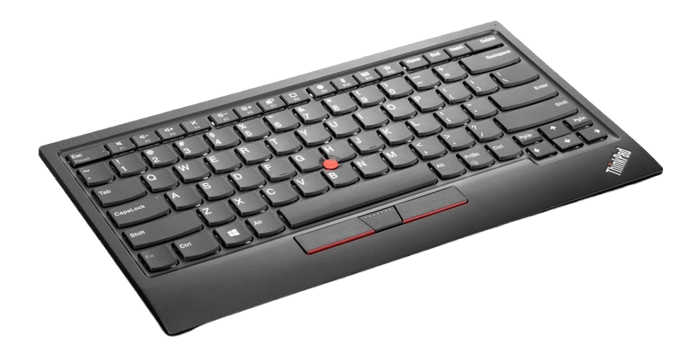
Lenovo USB TrackPoint keyboard, literally the most versatile thing, ever.
In regard to Richard's comments that the TrackPoint needs to go away when "something better comes along" (or rather came before), you have to be wilfully ignorant to discard its advantages that a touchpad or mouse, lack. It really has nothing to do with nostalgia (especially as the TrackPoint is the youngest HID of the bunch) but functionality and workflows. You can use your computer more efficiently and faster with a TrackPoint since your hand never comes off the keyboard. And if you absolutely must use a touchpad, the only acceptable use is on macOS, they're still unusable on Windows, yes, even in 2026.
I'll never really understand the baseless TrackPoint hate-- to a point, I was guilty of it too, that is, BEFORE I used it. Swinging back to 2007 when I was a teenager and got my first T60p, I was actually weirded out by the TrackPoint as I had never seen such a thing before, and remember thinking: "why did IBM put this stupid thing on there???". My opinion of it rapidly changed though as I began to gradually use it over the touchpad. I don't recall the exact motivation that lead me to using the TrackPoint (I remember it took me about a month before I reached a ceiling of maximum efficiency), it was probably just curiosity to be honest. Then it lead me to seeing if I could play Bejeweled 2 and Zuma faster with the TrackPoint than the touchpad, which I was eventually able to do. And yes, that would still apply today with a modern ThinkPad touchpad on Windows, they're not good if you're a power user. *shrug*