Information and Software for IBM Token Ring NICs
After noticing a general lack of information for listing all of IBM's Token Ring NICs (which was becoming a problem when I was doing some experiments with a few), corresponding FRUs, drivers, information... this page makes an effort to rectify that. Some of it has been reclaimed from my private archives, and elsewhere from forgotten corners of the internet.
IBM Token Ring NICs (Complete List, Supporting Info Experimental)
Finding your NIC drivers: you will need to leverage IBM's adapter reference PDF or use the list I created below (while the card names and FRUs are correct, the fourth supporting information column may not be as it's experimental and was a lot to crunch through), and find the corresponding .EXE for your card. ISOs that IBM provided with some of the PCI cards & drivers are also included here. To make things easier however, I also extracted and attempted to organise everything best I could. While Linux Token Ring drivers used to exist and be supported, they've all since been removed out of the kernel.
| Bus | Card Model | FRU(s) / Orderable Kits | Drivers / Filenames / OS Support |
|---|---|---|---|
| PCI | IBM 16/4 Token-Ring Low Profile PCI Management Adapter | 07P2701, 07P2710, 07P2799, 07P2709 | Driver: IBMTRP.OS2, IBMTRP.DOS; CD Image: CDIMAGE.EXE; Supported: DOS, OS/2, Win 95/98/NT/2000 |
| PCI | IBM 16/4 Token-Ring PCI Adapter 2 | 34L0601, 34L0610, 30L6826; 31L3520, 30L6829; 31L3521 | Driver: IBMTRP.OS2 (v2.04), IBMTRP.DOS; Filename: DIAGDISK.EXE, PCIFLASH.EXE; Supported: DOS, OS/2, Windows, NetWare |
| PCI | IBM 16/4 Token-Ring PCI Adapter 2 with Wake on LAN | 34L0701, 34L0710, 30L6208, 30L6817, 31L3266, 30L6390 | Driver: IBMTRP.OS2, IBMTRP.DOS; Alert Cable: 30L6390; Supported: DOS, OS/2, Windows |
| PCI | IBM 16/4 Token-Ring PCI Management Adapter | 34L5001, 34L5010, 34L5099, 34L5009 | Driver: IBMTRP.OS2, IBMTRP.DOS; Filename: LCDISK1.EXE, PCIPKG.EXE; Supported: DOS, OS/2, Win 9x/NT/2000 |
| PCI | IBM Auto LANStreamer PCI Adapter | 55H8985; 42H0658; 92G8457, 4H8098; 42H3377, 04H8095; 04H8101; 04H8102; 13H8854; 04H8105; 13H8848; 25H1728; OTRPASY; OTRPASG; OTRPASS | Driver: IBMMPC.DOS, IBMMPC.OS2, STREAMER.VXD; Filename: TRPALS1.EXE to TRPALS5.EXE |
| PCI | IBM High-Speed 100/16/4 Token-Ring PCI Adapter | 25L5572 | Driver: IBMTRP.OS2, IBMTRP.DOS; Filename: DIAGDISK.EXE, PCIFLASH.EXE; Supported: DOS, OS/2, Windows |
| PCI | IBM High Speed 100/16/4 Token-Ring PCI Management Adapter | 34L0501, 34L0510, 25L5572, 30L5980, 42H2397, 76H7254 | Driver: IBMTRP.OS2, IBMTRP.DOS; Wake Cables: 42H2397, 76H7254; Supported: DOS, OS/2, Windows |
| PCI | IBM PCI Token-Ring Adapter | 08L3222; 01L1968, 41H8874; 08L3334; 86H1896, 41H8900; 75H9800; 75H9802; 85H3410; 86H1897; 85H3409; 85H3412; 85H3414; 75H9806 | Driver: IBMTRP.OS2, IBMTRP.DOS; Filename: DIAGDISK.EXE; Supported: DOS, OS/2, Windows |
| PCI | IBM PCI Wake on LAN Token-Ring Adapter | 86H1879; 08L3226; 08L1826, 08L3335; 86H1888, 86H1880; 86H1886; 86H1887; 08L3340; 08L3294 | Driver: IBMTRP.OS2, IBMTRP.DOS; Filename: DIAGDISK.EXE; Supported: DOS, OS/2, Windows |
| PCI | IBM Triple LANStreamer PCI Adapter | 25H6301, 25H6305, 25H6304; 25H6308; 25H6309; OTRRASY | Driver: IBMMPC.OS2, IBMMPCO.LAN, STREAMER.VXD; Filename: TRPTLS1.EXE, TRPTLS2.EXE |
| ISA | IBM 16/4 Token-Ring Network ISA-16 Adapter | 60G3994, 73G2048; 30L7587, 73G2032; OTRABSE; OTRABSG; OTRABSS, 73G2042 | Driver: IBMTOK.DOS, IBMTOK.OS2, TOKEN.COM; Filename: TRI164T1.EXE to TRI164T4.EXE |
| ISA | IBM Auto 16/4 Token-Ring ISA Adapter | 41H8450; 41H8462; 42H3470; 55H6848; 92G7638, 92G7668; 41H8452; 41H8454; 92G7644; 30L7587, 92G7632; 92G7665; 92G7658; 92G7660; OTRACSY; OTRACSG; OTRACSS, 13H9536 | Driver: IBMTOK.DOS, IBMTOK.OS2, TOKEN.COM; Filename: TRI164T1.EXE |
| ISA | IBM Auto Wake Token-Ring ISA Adapter | 01L1530; 55H6800, 55H6810, 55H6760; 55H6815; 55H6807; 55H6783; 55H6818; 55H6824; 55H6828 | Driver: Uses Turbo ISA 16/4 Files; Wake Cables: 42H2397, 76H7254 |
| ISA | IBM Token-Ring Network 16/4 Adapter | 25F9494; 74F9327; 92F4555; 92F9119; 74F9781; 92F4554; 39F8370, 25F9492; 93F0334; 25F8884; 92F9119, 25F7367; 25F9522; 25F9493; 25F9525, 25F9523; 25F9524; 74F9325; 74F9326; 92F4538; 92F4539; 74F2954; 74F2955; 25F8923 | Driver: IBMTOK.DOS, IBMTOK.OS2, TOKEN.COM; Filename: TRIAU2.EXE, TRI164.EXE |
| ISA | IBM Token-Ring Network 16/4 Adapter II | 03F0216; 03F0300; 78G9640, 03F0212; 78G9645; 03F0273; 03F0256; 78G9653, 03F0215; 60G0989; 54G2421; 54G2422; 54G2423; 54G2424; 54G2425; 54G2426; 03F0255; 78G9647; 78G9648; 78G9649; 78G9650; 78G9651; 78G9652, 03F0227; 03F0297; 03F0228; 03F0293 | Driver: IBM16TR.DOS, IBM16TR.OS2; Filename: TRI1642.EXE |
| ISA | IBM Turbo 16/4 Token-Ring ISA Adapter | 72H3500, 72H3496; 30L7587, 72H3482; 72H3514; 72H3495; 72H3501; 72H3516; 72H3518; 72H3520 | Driver: IBMTOK.DOS, IBMTOK.OS2, TOKEN.COM; Filename: TRI164T1.EXE, TRIFLASH.EXE |
| CardBus | IBM 16/4 Token-Ring CardBus Adapter | 34L4801, 34L4810, 34L4899, 34L4809, 31L5035, 31L5057, 73G8315 | Driver: OS2NDISP.exe, IBMTRP.OS2; Filename: DIAGDISK.EXE, RUI.EXE; Supported: OS/2, Windows |
| PCMCIA | IBM 16/4 Token-Ring Credit Card Adapter | 0933462, 0933030, 0933462 | Driver: PCMNICCS.DOS, PCMNICCS.OS2; Filename: ETCC.EXE |
| PCMCIA | IBM 16/4 Token-Ring Credit Card Adapter II | 0933931, 0933929, 0933931 | Driver: PCMNICCS.DOS, PCMNICCS.OS2; Filename: ETCC.EXE |
| PCMCIA | IBM Auto 16/4 Token-Ring Credit Card Adapter | 92G9352, 04H6922; 92G9349; 13H7359 | Driver: Use Turbo PCMCIA 2 Driver Files; Filename: TRPCFLSH.EXE |
| PCMCIA | IBM Turbo 16/4 Token-Ring PC Card | 85H3636, 85H3656, 85H3628; 85H3629; 85H3650; 85H3652; 85H9139; 01L1980; 01L1982; 85H9180; 01L1981; 85H9181; 85H3676; 85H3677 | Driver: IBMTOKCS.DOS, IBMTOKCS.OS2; Filename: DIAGDISK.EXE |
| PCMCIA | IBM Turbo 16/4 Token-Ring PC Card 2 | 34L1401, 34L1410, 34L1499, 34L1409, 34L1402; 34L1411, 34L1402, 34L1411, 38H7044, 73G8315 | Driver: IBMTOKCS.DOS, IBMTOKCS.OS2; Filename: DIAGDISK.EXE, LaidPKG.EXE |
| MCA | IBM 16/4 Token-Ring Network Adapter/A | 26F0170; 39F6244; 39F8501; 74F2894; 53F4034; 74F2919; 74F3306; 74F8406; 92F6959; 74F3466; 74F8609; 92F6960; 93F0179; 93F1275; 60G0630, 16F1144; 53F4036; 53F7748; 93F0331; 53F7747; 93F0333; 74F9415, 16F1133; 25F9528; 53F7750; 53F7749; 74F9410; 92F4520, 25F9523; 25F9524; 74F9325; 74F9326; 92F4538; 92F4539; 25F9531; 25F9532; 74F9686; 74F9687; 60G2483; 60G2484; 25F8923 | Driver: IBMTOK.DOS, IBMTOK.OS2; Filename: TRM164.EXE |
| MCA | IBM Auto 16/4 Token-Ring MC Adapter | 92G7689, 92G7694; 92G7695, 92G7682; 92G7704; 92G7712; 92G7722; 25H3186; 25H5358; OTRFASY; OTRFASG; OTRFASS | Driver: IBMTOK.DOS, IBMTOK.OS2; Filename: TRM164.EXE |
| MCA | IBM Auto LANStreamer MC32 Adapter | 42H2707; 92G8711; 73G9782, 42H2706; 42H2716; 60G1593; 60G1595, 42H2705; 42H2715; 42H2717; 60G1592; 60G1594; 73G4661; 04H6181; 73G4216; 04H6184; 04H6186; 04H6185; 04H6187; OTRHCSY | Driver: IBMMPC.DOS, IBMMPC.OS2, STREAMER.SYS; Filename: TRMALS1.EXE, TRMALS2.EXE |
| MCA | IBM Dual LANStreamer MC32 Adapter | 42H2722; 73G5616, 42H2709; 73G7140, 73G7137; 04H7408; 73G7138; OTRIASY | Driver: IBMMPC.DOS, IBMMPC.OS2, STREAMER.SYS; Filename: TRMDLS.EXE |
| MCA | IBM LANStreamer MC16 Adapter | 74G0803, 74G0800, 74G0801; 92G9016; 74G0813 | Driver: IBMMPC.DOS, IBMMPC.OS2, STREAMER.SYS; Filename: TRMLS16.EXE |
| MCA | IBM LANStreamer MC32 Adapter | 74G0099; 74G0103, 74G0098; 74G0122, 74G0103; 92F8942; 74G0102; 60G1100; 92G9015 | Driver: IBMMPC.DOS, IBMMPC.OS2, STREAMER.SYS; Filename: TRMLS322.EXE |
| MCA | IBM Token-Ring Network 16/4 Busmaster Server Adapter/A | 74F4134; 74F8653; 93F1277, 74F4149, 74F4140 | Driver: IBMTRBM.OS2, TOKENDMA.LAN; Filename: TRMBUSM.EXE |
| EISA | IBM Token-Ring Network 16/4 Busmaster EISA Adapter | N/A | Driver: IBMEITR.DOS, IBMEITR.OS2, TOKENEI.COM; Filename: TRE164.EXE |
Downloads
Manuals
- IBM LAN Adapter Drivers Quick Reference
- 16/4 Token-Ring CardBus Adapter User's Guide
- 16/4 Token-Ring Low Profile PCI Management Adapter User's Guide
- 16/4 Token-Ring PCI Management Adapter User's Guide
- High-Speed 100/16/4 Token-Ring PCI Management Adapter User's Guide
- IBM Token-Ring PCI Family Adapter User's Guide | Includes information about: IBM 16/4 Token-Ring PCI Adapter 2, IBM 16/4 Token-Ring PCI Adapter 2 with Wake on LAN, IBM High-Speed 100/16/4 Token-Ring PCI Adapter
- Local Area Network Concepts and Products: Adapters, Hubs and ATM
- Token Ring Solutions
- Token Ring: Why buy from IBM?
- Token-Ring PCI Adapter Installation and User's Guide (93H9807)
- Token-Ring Adapter Features
Firmware, Drivers, & Software
- OS/2 Driver Package (supports: IBM PCI Token-Ring Adapter, IBM PCI Wake on LAN Token-Ring Adapter, IBM 16/4 Token-Ring PCI Adapter 2, IBM 16/4 Token-Ring PCI Adapter 2 with Wake on LAN, IBM 16/4 Token-Ring PCI Special, IBM High-Speed 100/16/4 Token-Ring PCI Adapter, IBM 16/4 Token-Ring PCI Management Adapter, IBM 16/4 Token-Ring PCI Management Adapter with Alert on LAN, IBM High-Speed 100/16/4 Token-Ring PCI Management Adapter, IBM 16/4 Token-Ring CardBus Adapter + special ThinkPad Model 600 CB_PEOS2.SYS driver)
- MS-DOS Driver Package (supports: IBM PCI Token-Ring Adapter, IBM PCI Wake on LAN Token-Ring Adapter, IBM 16/4 Token-Ring PCI Adapter 2, IBM 16/4 Token-Ring PCI Adapter 2 with Wake on LAN, IBM High-Speed 100/16/4 Token-Ring PCI Adapter)
- Windows (NT 3.51, 4.0, 9x, 2000, Workgroups, XP) Driver Package (supports: I assume all PCI NICs???)
- Windows (95, 98, NT 4.0) Driver Package (supports: IBM's legacy "512LOGO" package, I do not know what this supports)
- NetWare (Novell NetWare Server and 32-bit Client, Novell NetWare DOS Requester (16-bit), Novell NetWare OS/2 Requester (16-bit)) Driver Package (supports: I assume the PCI and possibly ISA NICs?)
CD-ROM Libraries
- IBM Token-Ring PCI Family Adapters (31L3803)
- IBM Token-Ring CardBus and PCI Management Adapters (36P3300)
IBM Token-Ring PCI Family Adapters (Installation and CD-ROM Guide)
Part Number: 31L3803
Using this CD-ROM you can: go to the IBM Networking website for the latest device drivers and diskette images, install drivers directly from this CD-ROM, create portable install diskettes, create RUI diskettes, create a bootable diagnostic diskette, view or print the manuals. This CD-ROM can be used with DOS, Windows NT, Windows 95, Windows 98, and OS/2.
Second Edition (May 1999). This booklet applies to the IBM Token-Ring PCI Family Adapters.
Introduction and Product Features
The IBM Token-Ring PCI Family Adapters are 32-bit, bus-master, Token-Ring adapters for the PCI bus architecture. The unique, high-quality filter design supports connection to a Token-Ring network that is wired with STP or UTP cabling. The adapters can be used in a PCI-compatible slot that operates at speeds between 16 and 33 MHz.
The technology of the IBM Token-Ring PCI Family Adapters provides the necessary functions required for a complete system solution for computers which incorporate Wake on LAN. You will not see a difference in the device driver name or the identifiers displayed during installation or status reporting.
See IBM Token-Ring PCI Family Adapter Features for information regarding the following features: DHCP, Remote Program Load (RPL), IBM LAN Client, LAN Adapter Management Agent, Route Switching, Class of Service, Redundant NIC, Performance Tuning.
The enclosed CD-ROM contains device drivers, supporting applications, publications, technical tips, and frequently asked questions related to the IBM Token-Ring PCI Family Adapters.
CD-ROM Content
The CD-ROM contains adapter drivers, supporting applications, publications, technical tips, and frequently asked questions related to the IBM Token-Ring PCI Family Adapters. A navigational tool is provided to assist in accessing the contents of the CD-ROM. This tool can be launched by opening the file x:\web\essmain.htm (where x is the letter of your CD-ROM drive) in a web browser. Release date information can be obtained from the CD-ROM by selecting your adapter from the section CD-ROM - release date information. However, the IBM Networking website might contain more current information. If you have internet access, you can obtain the most current drivers and information by selecting your adapter from the section IBM Networking Website - current information.
** omitted the rest as duplicate or very similar info is repeated to the booklet below **
IBM Token-Ring CardBus and PCI Management Adapters (Installation and CD-ROM Guide)
Part Number: 36P3300
Using this CD-ROM you can: go to the IBM Networking website for the latest device drivers and diskette images, install drivers directly from this CD-ROM, create portable install diskettes, create RUI diskettes, create a bootable diagnostic diskette, view or print the manuals. This CD-ROM can be used with DOS, Windows NT, Windows 95, Windows 98, and OS/2.
First Edition (June 2000). This booklet applies to the IBM Token-Ring CardBus and PCI Management Adapters.
Introduction and Product Features
The IBM Token-Ring CardBus and PCI Management Adapters are 32-bit, bus-master, token-ring adapters. The unique, high-quality filter design supports connection to a token-ring network that is wired with shielded twisted-pair (STP) or unshielded twisted-pair (UTP) cabling. The IBM Token-Ring PCI Management Adapters can be used in PCI-compatible slots that operate at speeds up to 33 MHz. The IBM 16/4 Token-Ring Low Profile PCI Management Adapter is designed for use in low profile computers with PCI-compatible slots. The IBM 16/4 Token-Ring CardBus Adapter is designed for use in laptop computers with Type II CardBus slots. The technology of the IBM token-Ring CardBus and PCI Management Adapters provides the necessary features for a complete system solution for computers that incorporate Wake on LAN®.
For information about the following features, refer to the IBM Token-Ring Adapter Features publication: Preboot Execution Environment (PXE), Remote Program Load (RPL), LAN Adapter Management Agent, Route Switching, Class of Service, Redundant NIC (RNIC), Tivoli® Management Agent.
The enclosed CD-ROM contains device drivers, supporting applications, publications, technical tips, and frequently asked questions related to your adapter.
CD-ROM Content
Note: the tables in the following sections list all the software packages and diskette images that are provided on this CD-ROM. To determine which software packages and diskette images are applicable to your particular adapter, refer to "Appendix A. CD-ROM content and software packages." In the user's guide for your adapter. For information on accessing the user's guide, see "Product documentation" on page 7.
A navigational tool is provided to help you access the contents of the CD-ROM. To launch this tool, open the file x:\starcd.htm (where x is the letter of your CD-ROM drive) in a web browser. You can obtain release date information from the CD-ROM by selecting your adapter from the section CD-ROM - release date information.
However, the IBM Networking website might offer more current information. If you have internet access, you can obtain the most current drivers and information by selecting your adapter from the section Networking Website - current information. The web download packages and CD-ROM contain the following items: User's guide and feature publication in HTML and PDF format, self-expanding PACKAGE and IMAGE files, device drivers that can be installed directly from the CD-ROM during the device driver install process. They are located in the directories listed in Table 1.
Table 1. Driver file directory structure.
| Operating System | Directory |
|---|---|
| Windows NT® 4.0 | \(root) |
| Windows NT 3.51 | \win32 |
| Windows® 95 retail | \win32 |
| Windows 95 OSR2 | \(root) |
| Windows 98 | \(root) |
| Windows 2000 | \(root) |
| Windows for Workgroups | \WFW |
| Novell NetWare Server and 32-bit Client | \NOVELL\NETWARE |
| Novell NetWare DOS Requester (16-bit) | \NOVELL\DOS |
| Novell NetWare OS/2 Requester (16-bit) | \NOVELL\OS2 |
| OS/2® | \OS2 |
| DOS | \DOS |
Software Packages
Table 2 lists packages that are available on the web and on the CD-ROM. Table 3 lists diskette images that are available on the web and on the CD-ROM. You can obtain them by using the navigational tool previously mentioned.
Table 2 software packages.
| Package | Description | Executable |
|---|---|---|
| CD-ROM | Complete CD-ROM content | CDIMAGE.EXE |
| Device Drivers (*) | DOS and Windows 3.x (NDIS 2) Novell NetWare DOS Requested (16-bit) Novell NetWare Server and Client OS/2 (NDIS 2) Windows 95/NT 3.51 Windows 95 OSR2/98/NT 4.0/2000 Windows for Workgroups |
DOSNDISP.EXE DOSODIP.EXE NETWAREP.EXE OS2NDISP.EXE WIN32PKG.EXE PC99LOGO.EXE WFWPKG.EXE |
| Managed Driver Upgrade | Windows 95 OSR2 Windows 98 Windows NT 4.0 Windows 2000 |
WINMDU95.EXE WINMDU98.EXE WINMDUNT.EXE WINMDU2K.EXE |
| Documentation - HTML and PDF | User's Guide IBM 16/4 Token-Ring PCI Management Adapter IBM High-Speed 100/16/4 Token-Ring PCI Management Adapter IBM 16/4 Token-Ring Low Profile PCI Management Adapter IBM 16/4 Token-Ring CardBus Adapter Features Guide |
USERMGMT.EXE USERHSTR.EXE USERLOWP.EXE USERCB.EXE FEATURES.EXE |
| Troubleshooting Utility | Windows 95 OSR2/98/NT 4.0/2000 | TRSHOOT.EXE |
| LAN Adapter Management Agents | OS/2 Windows 95/98/NT/2000 |
DMIOS2.EXE DMIWIN.EXE |
| PCI Setup (*) | PCI Setup Utility | PCIPKG.EXE |
| RPL (*) | Remote Program Load (RPL/DHCP/PXE) | RPLPKG.EXE |
| Tivoli Management Agents (*) | Windows 3.x Windows 9x Windows NT OS/2 NetWare 3.x NetWare 4.x and 5.x |
TMAW3X.EXE TMAW9X.EXE TMAWNT.EXE TMAOS2.EXE TMANW3X.EXE TMANW4_5.EXE |
Diskette Images
Run these diskette image files to create diskettes. Each image file will create a single diskette.
Table 3. Diskette images
| Image | Description | Executable |
|---|---|---|
| CID for OS/2 | Configuration, installation, and distribution diskette | CID.EXE |
| Diagnostics | Diagnostics | DIAGDISK.EXE |
| LAN Adapter Management Agents | OS/2 - Diskette 1 OS/2 - Diskette 2 Windows 95/98/NT/2000 - Diskette 1 Windows 95/98/NT/2000 - Diskette 2 Windows 95/98/NT/2000 - Diskette 3 |
DMIOS2A.EXE DMIOS2B.EXE DMIWINA.EXE DMIWINB.EXE DMIWINC.EXE |
| PCI Flash | PCI Flash Update diskette | PCIFLASH.EXE |
| RUI | Remote unattended install diskette for Windows 95/98/NT/2000 | RUI.EXE |
Hardware Installation
Danger: before you begin to install this product, read the safety information in: Caution: Safety Information-Read This First, SD21-0030. This booklet describes safe procedures for cabling and plugging in electrical equipment.
If you have one of the IBM Token-Ring PCI Management Adapters, see "Installing your IBM Token-Ring PCI Management Adapter." If you have the IBM 16/4 Token-Ring CardBus Adapter, see "Inserting and removing your IBM 16/4 Token-Ring CardBus Adapter".
Installing your IBM Token-Ring PCI Management Adapter
To install your adapter, perform the following steps: 1) switch OFF the PC and all attached devices. Note: in the UK by law, telephone line cables must be disconnected from the PC before the power cord. 2) Remove the power cord from the outlet. 3) Remove all cables from your PC. Label each cable for easier reconnection at the end of this procedure. 4) Follow the instructions provided in your PC manual for removing the cover or otherwise accessing the adapter slots and inserting the adapter. 5) Install the adapter according to the instructions for adapter installation in the manual that came with your PC. Note: if you will be using the Wake on LAN feature, then depending on the orientation of the adapter to your computer, you might need to connect the Wake on LAN cable to your adapter before inserting the adapter into the slot in your computer. The IBM 16/4 Token-Ring PCI Management Adapter and the IBM 16/4 Token-Ring Low Profile PCI Management Adapter do not require a cable for Wake on LAN. 6) Take one of the following actions: install the Wake on LAN cable for the IBM High-Speed 100/16/4 Token-Ring PCI Management Adapter, if you are installing an adapter that does not support Wake on LAN, requires no cable, or if you do not want to install the Wake on LAN feature, continue to the next step of the procedure. 7) Secure the adapter in the PCI slot with the retaining screw or other bracket lockdown mechanism. 8) Reinstall all removed covers. 9) Connect the token-ring cable to the adapter and to the network. 10) Reconnect all cables to your computer and then connect the power cord. Follow all safety instructions. Note: in the UK by law, the power cord must be connected before the telephone line cable. 11) The hardware installation is complete.
Installing the Wake on LAN cable for the IBM High-Speed 100/16/4 Token-Ring PCI Management Adapter
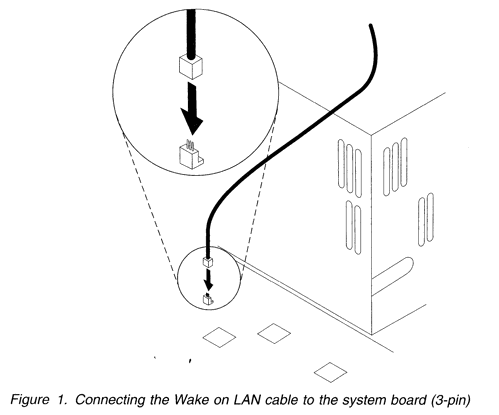
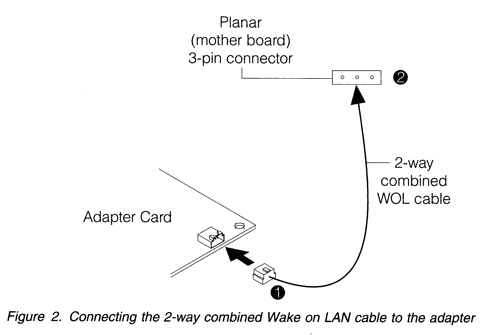
This adapter uses a 2-way combined Wake on LAN signal and power cable (PN 08L2558). Each end of the cable has one 3-pin connector. The ends of the cable are identical and interchangeable. To install the cable, perform the following steps: 1) connect either end of the cable to the system board as shown in figure 1.
2) Connect the other end of the cable to the adapter as shown at number 1 in figure 2.
3) Secure the adapter in the PCI slot with the retaining screw or other bracket lockdown mechanism. 4) Reinstall all removed covers. 5) Connect the token-ring cable to the adapter and to the network. 6) Reconnect all cables to your computer and then connect the power cord. Follow all safety instructions. 7) The hardware installation is complete.
Selecting adapter cables
To connect your adapter to a token-ring network, you will need one of the cables shown in figure 3.
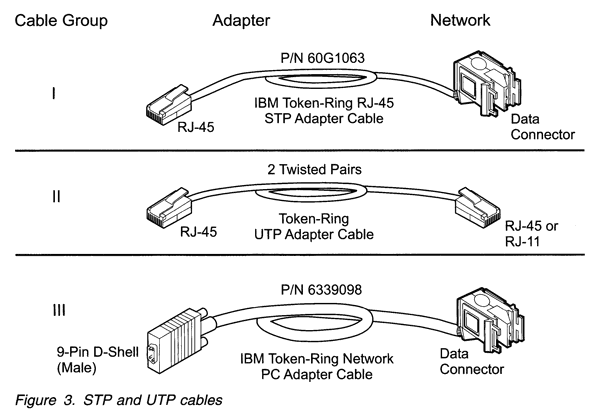
These cables are not included with the adapter. The network card of the cable must be compatible with the network faceplate or other device to which the adapter will be connected.
Note: no more than one data cable may be connected to the adapter at a time.
If you have the IBM 16/4 Token-Ring PCI Management Adapter, you can use any of these cables. If you have the IBM 16/4 Token-Ring Low Profile PCI Management Adapter, you can use cables from group I or group II. If you have the IBM High-Speed 100/16/4 Token-Ring PCI Management Adapter, you can use cables from group II (category 5 or better) or cables from group III. You cannot use cables from group I. You cannot use the combination of a conversion cable (PN 60G106 with a cable from group III).
Inserting and Removing your IBM 16/4 Token-Ring CardBus Adapter
If you are using Card and Socket Services, you may be able to use hot-pluggability features. Refer to: "Hot puggability and suspend/resume issues" in the IBM 16/4 Token-Ring CardBus User's Guide. Note: the adapter only works with laptop computers that support CardBus.
Inserting the adapter
To insert the adapter into your computer, perform the following steps: 1) switch OFF the power to the computer. 2) Determine what type of network cable to use and connect the cable to the new network. Note: shielded cables and connectors must be used in a Class B environment. If your network uses STP or UTP cabling with an RJ-45 telecommunications outlet, attach the RJ-45 (8-pin modular) connector on the adapter cable (PN 31L50534) to the RJ-45 telecommunications outlet.
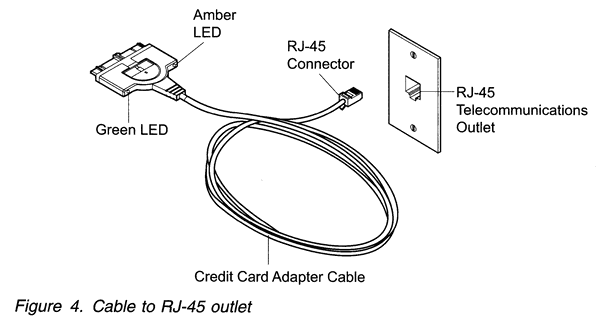
If your network uses STP cabling with an STP communications outlet, perform the following steps: a) attach the RJ-45 connector on the adapter cable (PN 31L5035) to the RJ-45 end of the STP connector (PN 73G8314). b) Attach the STP connector to the STP telecommunications outlet. The STP connector is specifically designed to work with the CardBus adapter.
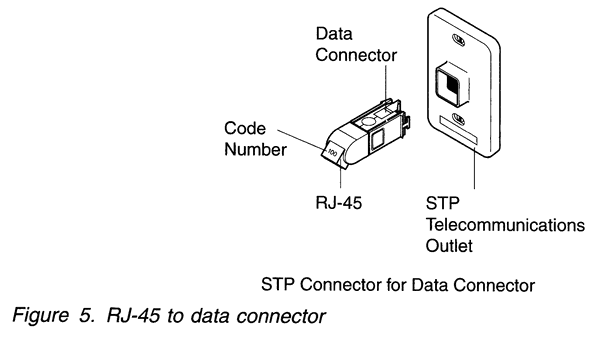
Note: verify that you are using the correct STP connector. The correct STP connector and adapter cable have the code number 100 on the connectors that attach to each other. 3) To attach the cable to the adapter, move the latching button (the half-circle in the centre of the cable connector) toward the cable. Attach the cable to the adapter with the cable part number on the bottom. Note: the connector is keyed to attach to the CardBus adapter only one way if you feel any resistance, remove the connector, turn it over, and reattach it.
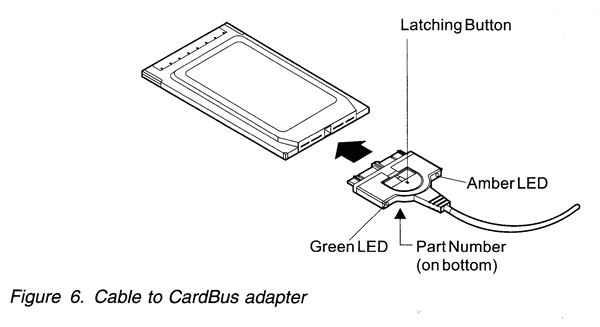
4) To lock the cable securely, move the latching button in toward the adapter. 5) Insert the CardBus adapter in the slot. If you are using a point enabler, note which slot you use. For information about point enablers, refer to "Point enablers and Card and Socket Services" in the IBM 16/4 Token-Ring CardBus Adapter User's Guide.
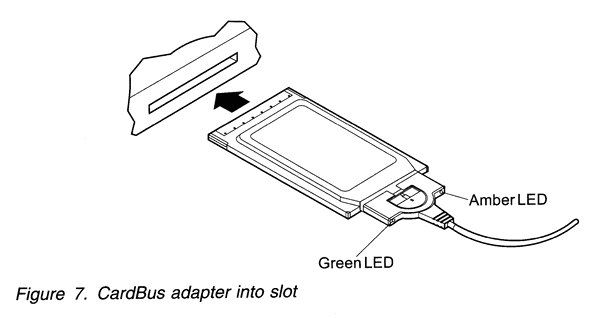
6) Switch ON the power to the computer.
Removing the adapter
To remove the adapter from your computer, perform the following steps: 1) switch OFF the power to the computer. 2) With the cable still attached to the adapter, pull the adapter from the computer. 3) To detach the cable from the adapter, retract the latching button (the half-circle in the centre of the connector) by moving it toward the cable. 4) Grasp the connector and unplug it from the adapter. 5) Store the adapter.
External Articles (of interest)
- [External] Ken Shirriff's Teardown of a vintage IBM token ring controller
- [External] Ray Zeisz's Introduction to IBM LANStreamer Adapters
- [External] IBM Token Ring Cabling
- [External] Hardware Announcement (ZG94-0338): IBM Dual LANStreamer MC 32 Adapter
- [External] Hardware Announcement (194-208): IBM Dual LANStreamer MC 32 Adapter
- [External] IBM Dual LANStreamer MC 32 Adapter
- [External] IBM Auto Wake Token-Ring 16/4 ISA Adapter
- [External] Wireshark: Token Ring capture setup
- [External] TLDP's Token-Ring mini-HOWTO
- [External] Mike Philips' Linux TokenRingProject
- [External] Adventures in Token Ring
Note: a Token Ring NIC in promiscuous mode will support full telemetry of IEEE 802.5 in Wireshark.
8P8C Pedantry
P.S. to the pedants who insist RJ-45 should not be used, and instead demand "8P8C", well... IBM's own documentation calls it RJ-45 as per above. Yes, someone clubbed me for not using "8P8C" to refer to RJ-45 Token Ring, as well as the Wikipedia editors that got hungry and swapped some of my references of RJ-45 to 8P8C. While 8P8C may be more technically correct, it's not universally recognised (especially not in context of Token Ring), not used by vendors, nor became the common reference everyone uses.

Some people like life to be more difficult than it has to be.
Wait... you're still reading this? You must like Token Ring more than I do.