Information and Software for the ThinkPad T60 / T60p
System Type: 1951, 1952, 1953, 1954, 1955, 1956, 2007, 2008, 2009, 2613, 2623, 2637
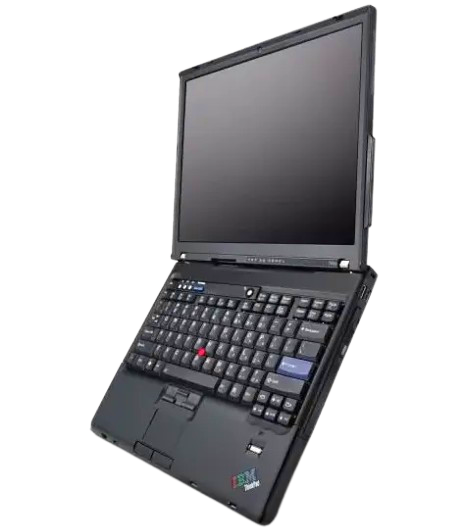
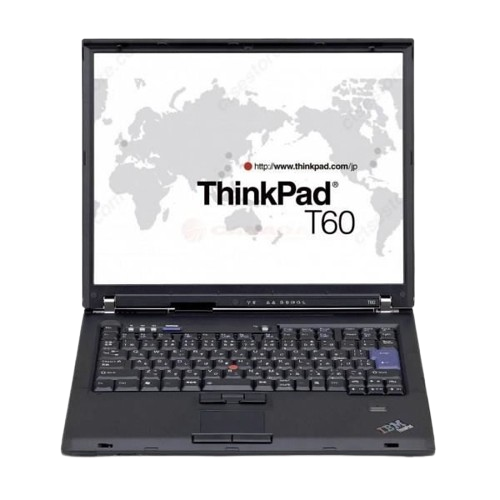
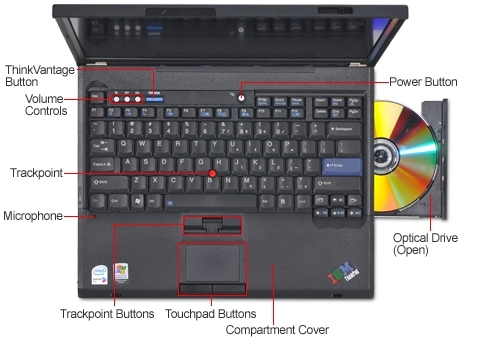
The T60 was released in 2006 and was the last ThinkPad to have IBM features escape through: high resolution 4:3 IPS screens, high quality NMB keyboards, the first ThinkPads with Core 2 Duo support, a rich docking station with every kind of legacy port and external GPU capabilities (Advanced Dock 2503), and so forth. However this is also the first ThinkPad that Lenovo started to dip their paws in, therefore: a windows key was added, Lenovo allowed the designers to drop the TrackPoint button colours (which were later re-added because they should have never been removed in the first place), OS/2 support was dropped, the sub 'grey keys' were removed making the keyboard entirely black except for the enter key, etc. But because IBM was still somewhat involved they can be considered 'quasi-IBM'.
Downloads
Manuals
Firmware, Drivers, & Software
- ATI FireGL V5200/5250 (Windows Vista, 7, 8, 10)Windows 10 can behave oddly with the FireGL 5250 driver, there will be an offending service that can spike CPU usage, it has to be disabled and excluded from startup.
- ATI Radeon x1400 (Windows Vista, 7, 8, 10)For the Radeon x1400 T60s, these boards' special driver procedures and are not as straightforward. Unfortunately I don't have the information for them.
- SoundMax Audio (Windows Vista, 7, 8, 10)
- Keyboard Hotkeys (Windows Vista, 7, 8, 10) - Optional
- PowerManager (Windows Vista, 7, 8, 10) - Optional
Although Lenovo doesn't seem to reference any Windows 7 drivers for the T60 on the support page, they do exist, and T60s run Windows 7 very well: I have only personally tested the V5200 motherboards. I can't recommend XP as it doesn't run nearly as well on the system and support has been discontinued by Microsoft (4/8/2011). Windows 7 update will find all of the drivers except the V5200, so you only have to install that one if required.
Time to CELEBRATE (if you're a 4:3 enthusiast)
One of the many celebrated highlights of this series is their capability to host high-density FlexView IPS displays (up to 1600x1200 OEM stock). 2048x1536 can be achieved through obtaining a denser FlexView and further modifications and ensuring the EDID firmware can address the higher resolution. While the 14.1" form factor is more common than the 15.1" variant, the higher resolution screens are not as common and were typically paired with higher-end discreet ATI GPUs. These higher end systems have the suffix of 'p' (i.e. T60p). It's also possible to equip the T60 with LED-backlit FlexView panels that were produced (not many, but some were). However, these panels are increasingly more difficult and expensive to find due to enthusiast demand.
The base 14.1" models typically sported an unimpressive 1024x768 display and either intel graphics or a lower-end ATI Mobility. The more expensive 14.1" models hosted a LG-Philips 1400x1050 TN display and a more capable Mobility x1400 or FireGL V5200; and later V5250. It is possible to perform an unofficial modification to install a 14.1" Sharp LQ141U1LH02 1600x1200 display: which is a very desirable resolution on that size (requires modifying either the display cable or panel itself). While lacking IPS this display still has a few advantages: it uses less power over the higher resolution IPS counterparts, smaller form factor, and it's generally dimmer and not as viewable from all angles meaning more privacy if working on sensitive data; similar to the effect why ATMs capitalise on this feature of TN displays.
The 'deluxe' docking station also supports a variety of features that are unusual, including hot-swappable PS/2 keyboards and mice.
Thermal Awareness
Traditionally T60s have not been the coolest laptops, especially if it has the ATI V5200 FireGL or Mobility x1400 chip or has been upgraded from a Core Duo to a Core 2 Duo (which has about 10 more watts of maximum thermal output). A few potential problems are as follows:
- The GPU and bridge are cooled with "thermal pillows" to fill the gap between the cooler and the actual dies. While it is effective at bridging the space, the thermal transfer is not optimal: and the pillows can wear out as they'll develop a memory each time you remove the heatsink. This has to be rectified with 0.8 mm copper shim pads. It's important to note that if you use copper shims, you are at risk of cracking the dies, proceed at your own risk.
- The fan after extended use can develop a dry sleeve (not ball-bearing based unfortunately). Thankfully the design is easy to take apart and add fresh lubricant (important to use lubricant that doesn't spread or break down as it won't last very long: requiring you to take the whole thing apart again for another application). Ensure the metal shaft annexed to the blades is well greased.
- Using a Core Duo instead of a Core 2 Duo to reduce thermal output **this will sacrifice your x64 support**
- There has been mention that using a revision 2 heatsink over a revision 1 provides better cooling: however, the revision 2 cooler shrinks the GPU heat pipe (which is the most problematic area of cooling).
- It is possible to connect a W500/T500 (45N5492 / 45N5493) heatsink into a T60 which offers a better smoother fan, better thermal capacity and direct contact to the GPU without the need of a thermal pillow. You will need to file down the heat block that protrudes slightly too much into the keyboard. But once done it fits without any problems into the laptop:
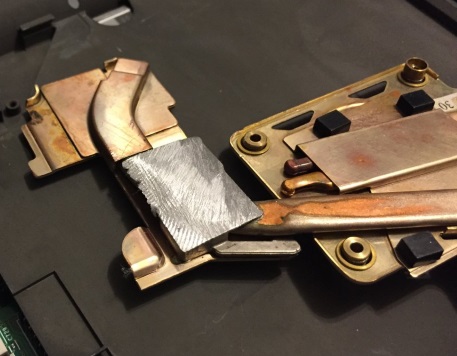
The W500/T500 heatsink is in my opinion the best route whether you're replacing the fan in your T60 or doing a T601 frankenpad mod. If you're using a T61 motherboard with the quad core mod and Quadro 570m, you *cannot* use these T60 heatsinks. The discolouration on the heat pipes in the photo is how the heatsinks just look (it was not me shaving that part down or anything, you ONLY shave the silver heat block.)
T60 Fan cooling
There are two major variant of heatsink coolers for the T60 series (regarding the discreet high-end ATI video graphics, there *are* other coolers which are far inferior: but even a non-impressive T60 would benefit from the high end coolers). It's important to note that both revisions of heatinks are *backwards compatible* between all 14.1" models; there is some misinformation that they cannot be interchanged but this is false. A T61 triple heatpipe heatsink can be hacked into a T60, but it does not offer considerable thermal advantages to be worth the effort (and in some cases may actually be worse as the fluid inside the heat pipes are calibrated specifically for T60s).
- FRU: 41V9932 (older-- for 14.1")
This is the earlier cooler with the GPU heat pipe circling around the fan in an L-shape. The GPU heat pipe is considerably longer and has its own vent at the back. The general notion is that this is the inferior heatsink for cooling: but may actually be better due to the fact the most problematic area of cooling is the GPU!
- FRU: 41W6407 (newer-- for 14.1")
This is the later revision featuring a few changes. The foam pads are rearranged to direct air in a more intelligent fashion, the CPU heat pipe is brought around both vents, and the GPU heat pipe has been shrunk dramatically as a result. The fan is shaped with a dip and has more blades.
The fans are produced in a very modular manner-- there are four coil magnets on the fan PCB where the top plastic blade assembly w/ rod slide into. When taking the fan out for oiling, it's recommended to use grease on the fan's spindle with oil in the well.
As mentioned previously, just use a W500/T500 heatsink and you can bypass all of the problems with the native T60/T61 heatsinks.
T60 Keyboard Variances
The T60 has one of the nicest feeling keyboards of any ThinkPad available and the richest TrackPoint implementation (and in my opinion, the best tactile TrackPoint buttons). However, three major manufacturers were contracted to make the keyboards resulting in three rather diffent feeling keyboards. It's important to note that all three are better than your average keyboard, but the differences are major enough to make note of:
- FRU: 39T0958 (manufactured by NMB | Minebea)
- FRU: 39T7118 (manufactured by ALPS)
- FRU: 39T7178 (manufactured by Chicony)
Generally the consensus is that the NMB/Minebea keyboards are the best (as they use a switch enclosure over the rubber 'bumper' instead of traditional scissor switch). ALPS comes next with very crisp scissor domes. And Chicony in last place with a slightly mushier feel. The ALPS TrackPoint buttons tend to be noisier, but I think they are the crispest. So if you use the TrackPoint more than typing, get an ALPS keyboard.
Note: Lenovo rebadged the FRU so that 39T0958 is now confused with other manufacturers; presumably due to the cost (newer ThinkPads don't seem to use NMB anymore, and there was a time when IBM exclusively used NMB such as on the TransNote). When looking for an NMB keyboard, always refer to photos, the back of NMB keyboards will have black rivets.
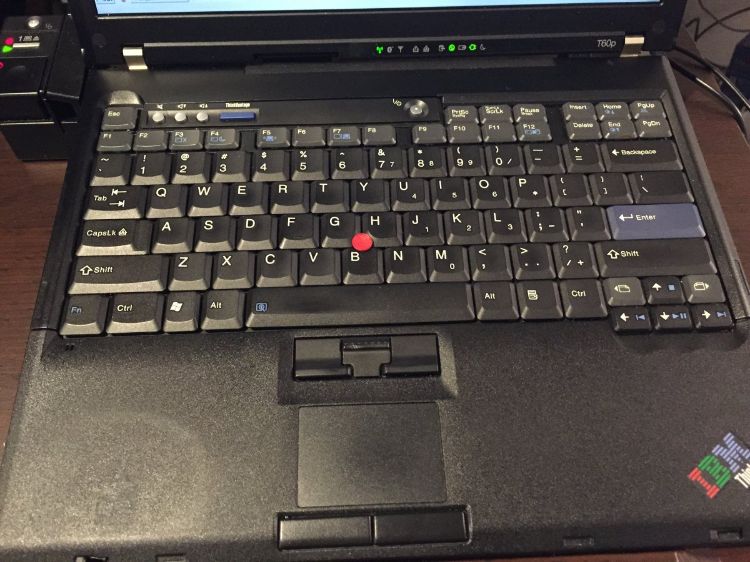
If you have a T43 NMB keyboard, the 'grey' keycaps will actually fit on a T60 NMB keyboard (although the fit isn't as snug so it's not as ideal as you'd think). Sure looks nice, though.
Creating a "T601" or "FrankenPad"
It is possible to merge a 14.1" / 15.1" / 15.4" T61 system board in a 15.1" / 14.1" T60 chassis to produce what is commonly called a "T601" or "FrankenPad" colloquially coined by RBS at theboardroom.info. This helps combine the modern advantages of a T61 system board with the physical advantages of the 15.1" T60 series including the FlexViews.
Note: merging the T61 motherboards in the T60 chassis is not a simple plug and play, depending on the size of T61 system board used and the size of T60 chassis used, different chassis hacking is needed.
It's also possible to put a T61 motherboard in a 14.1" T60. Less practical since you don't get any major advantage with utilising an IPS screen, however some prefer the symmetrical hinges of the T60 and the smaller form factor of the 14.1" T60p. Furthermore 14.1" T61 parts can be astronomically harder to obtain. And finally, you can still get 1600x1200 on 14.1" with the Sharp display along with 8 GB of RAM which isn't half bad for those who insist on the 4:3 ratio and like the 14.1" form factor.
The best T61 motherboard to use for "FrankenPad" builds is the 42W7872 along with Penryn T9300. This board features full support for Penryn CPUs and contains the Intel X3100 video controller: allowing the ThinkPad to run considerably cooler and avoid the problem of potentially defective nVidia chips. The only downside is that it's not at all very effective for 3D gaming or work, in which case you should elect for one of the nVidia boards such as 42W7874. Once that's done, put 8 GB of RAM in the motherboard and you have a venerable T60 laptop. Intel's official spec sheet on the GMA965 state the chipset only supports 4 GB of maximum memory, but this is in fact misinformation since the high capacity SODIMMs were not yet released to the market: so (any) T61 motherboard will gladly take and use a full 8 GB of RAM (2x4GB). There are however still many people that spread the misinformation that GMA965 only supports 4 GB (2x2GB).
Extra FrankenPad GPU memory
It is in fact possible to fit a 15.4" T61 motherboard (42W7877 / 44C3931) in a 14.1" T60 chassis. Some minor compromises have to be done to the UltraBay, but it can be done. This allows the best possible GPU (nVidia Quadro FX 570m @ 256 MB of RAM) in the smallest form factor. Taking it up a notch you could also put a Sharp UXGA display on it creating the best 4:3 14.1" laptop ever conceived. YOU CANNOT USE THE STOCK T60 HEATSINK WHEN DOING THIS!!! If you do, you risk burning out the Quadro 570 with the thermal pillow. For some reason only the 15.4" T61 motherboards featured 256 MB of video memory, the 4:3 boards were only 128 MB. Lenovo ditched the 4:3 models after a year, and when the nVidia GPU bug started killing off many boards, Lenovo didn't do much to fix it. In fact it was IBM that fixed and manufactured 'good' T61 motherboards behind the scenes for their corporate clients running T61s. The only 4:3 motherboards that have good nVidia GPUs from a safe date only ever came from that batch that IBM made. This actually shows that IBM did care about the 'quasi' ThinkPads (T60/T61) while Lenovo did absolutely nothing.
With that said, one of my 'bad' date wide screen T61s is still working fine almost two decades later, so, who knows.
Sharp LQ141U1LH02 UXGA mod on 14.1" ThinkPads
It is possible to run the Sharp LQ141U1LH02 display to get the full 1600x1200 resolution as enjoyed on the larger 15.1" T60s. However the display is not IPS, but that's a compromise you'll have to live with regarding the 14.1" form factor. There could be a 14.1" UXGA IPS display that's supported on the T6x platform, but I have yet to discover it.
You'll need to either cut one of the pins on the LCD's display itself, or on the IBM video connector. I opted for the IBM video connector because it's far easier to do. And you can always just buy another display connector in the event you want to go back (but the pins we're separating are just ground so I imagine the cable could be used again with the mod regardless). The pin that needs to be separated is shown here below:
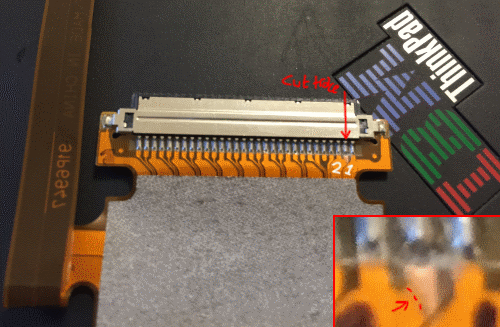
Once that's done you'll need to re-use the T60's inverter and discard any existing inverters present on the Sharp display.
WARNING: If you fail to separate the correct pins, you will in fact short out the motherboard with this display, and it will never work again. If you have a rare T61 motherboard, test it out on a low-end T60 motherboard first.
T60 Caveats
- Rumour has it very early revision T60 system boards won't be able to accept x64 Core 2 Duos. Unfortunately my early T60 board died before I could verify this; and such early T60 systems are very uncommon (they will lack physical lenovo badging). I highly doubt this claim though as the issue would typically be firmware and not the board.
- The Maximum amount of addressable RAM by a T60 systemboard is 3GB: partly in due to the memory controller and implementation by IBM/Lenovo (some other laptops using the same memory controller go a little above the flat line 3072 GB, supposedly?). There has always been some hot contention on this topic. A lot of early 64-bit Intel-based machines like to squirrel away from the full 4 GB though.
- 14.1" models do not support any of the IPS screens
T60 "Silver" Mod
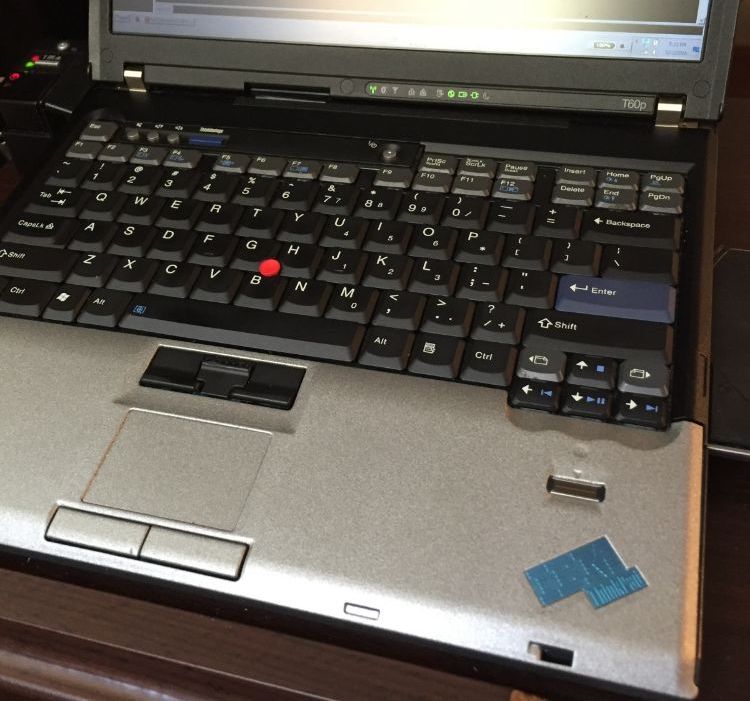
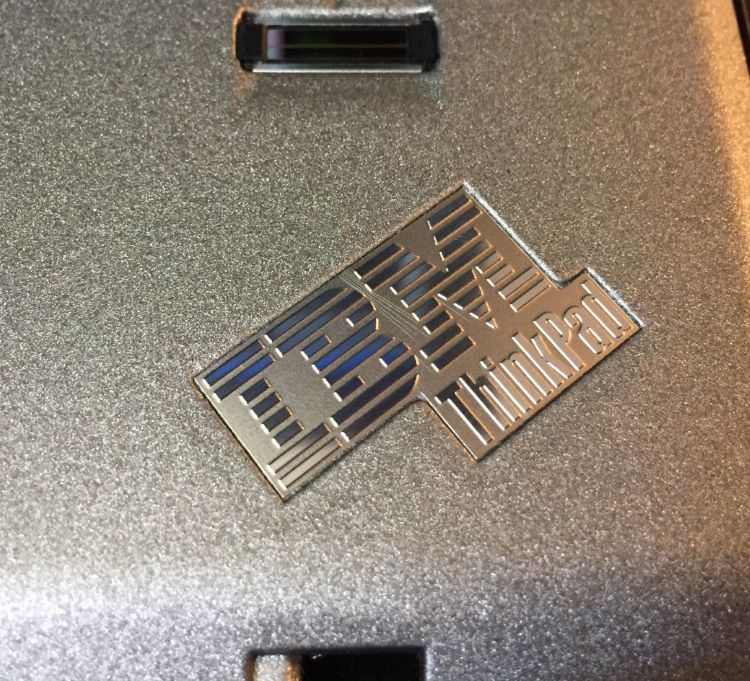
The Z series had a titanium lid, which meant IBM created special silver badges for these units, and they're quite nice. For a long time you could buy these from a Taiwan reseller who managed to grab stock of many of the unused OEM badges (I honestly wonder how). The stock has long since dried up and you can't buy them anymore, but as I have some I modded my T60 back in the day with a silver palm rest. Sadly the silver paint didn't hold up so it's no longer like this, but it sure looked nice...
It's Clear!
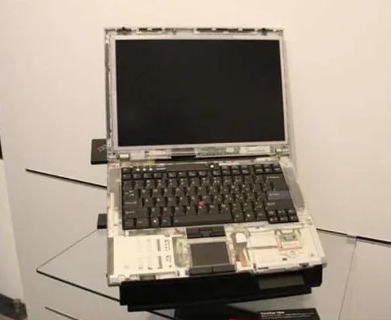
David Hill discussed about how they tried prototyping clear plastics for fun with the T60, however, the clear plastic was too brittle and never made it into production. This adds up as most clear plastic will be more brittle than opaque plastic.
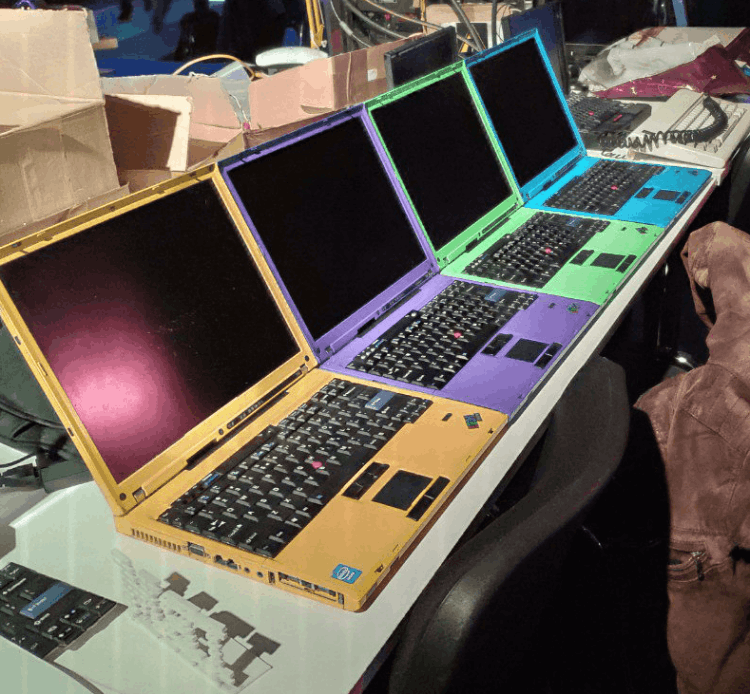
ColorWare Custom Colours
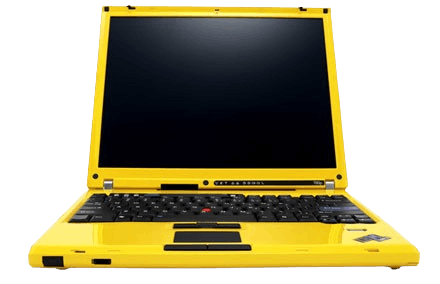
Back in the day, ColorWare offered a service to disassemble and paint the T60 series.
Specifications
----CPU Options----
*Intel Core Duo
*Intel Core 2 Duo
----Audio----
*SoundMax
----Video----
*Intel Graphics, ATI Mobility, ATI FireGL
----Memory----
3GB is the maximum allowed memory by the memory controller as it's crippled and can't even address 3.9 GB.